Keep data safe and every action recorded
Each customer's data is kept separate. People only see what their role allows, and an audit log shows who did what and when, including any change made in a recheck.
- Each customer's data kept separate
- Role-based access for admins, scan staff, markers, and moderators
- Audit log for marking, approvals, and rechecks
- Rechecks after results, with a full record of changes
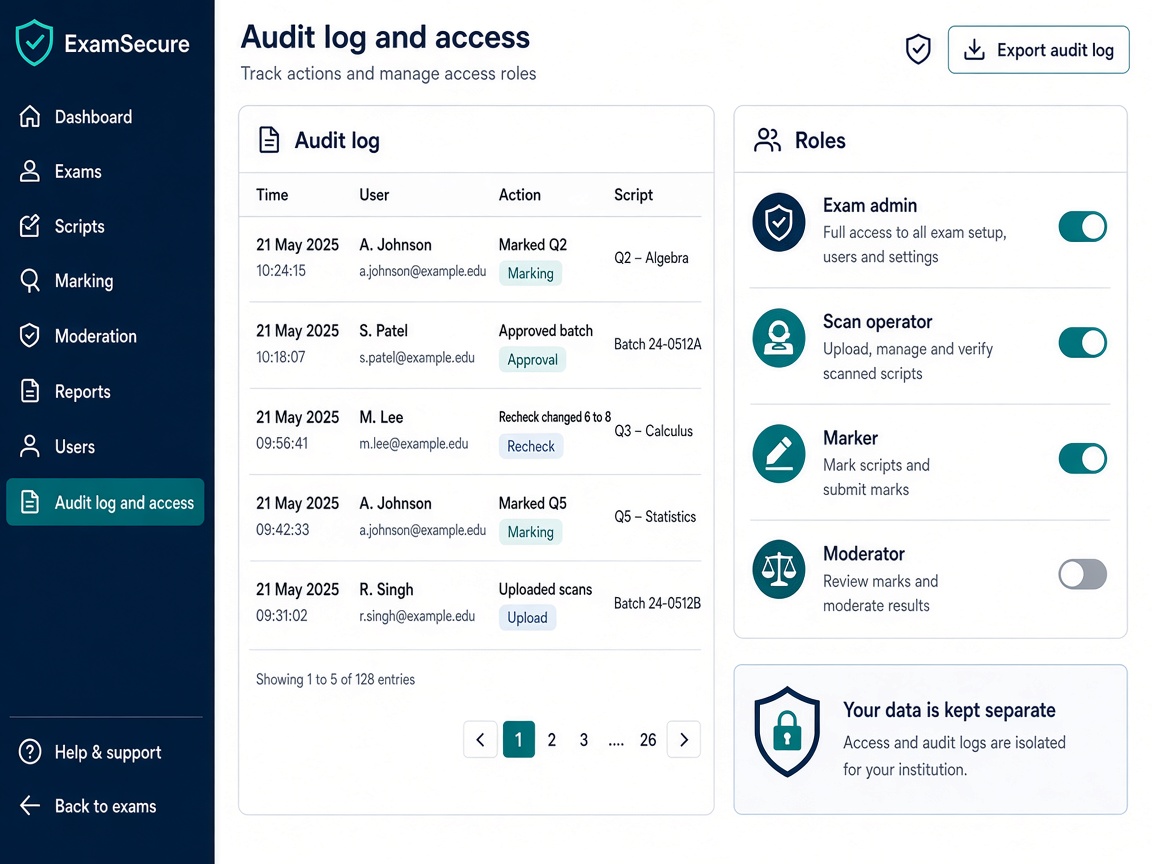
Isolation, roles, and secure access
High-stakes exams need each institution’s data kept apart—and each staff member seeing only what their job allows.
Separate data per customer
Your scripts, marks, and users are isolated from every other institution on the platform. Multi-tenant by design.
Roles that match the exam office
Exam admins, scan operators, markers, moderators, and agency staff get different screens—exam office vs marker vs external agency.
Controlled script access
Answer images use secure links, not open URLs. Access follows role and exam—not “anyone with the link.”
Enterprise-grade connections
Traffic uses modern encryption in transit, consistent with other enterprise SaaS products you already buy.
Prove how every mark was reached
When a board or university is audited, you need a log—not a folder of emails.
Audit log of important actions
See who marked, reviewed, approved a batch, exported results, or changed a score—and when it happened.
Workflow steps enforced
Scripts follow the steps you defined (uploaded → QC approved → assigned → marked → finalized). Policy shortcuts are blocked.
Recheck with full change history
After publication, allow a controlled recheck. Old mark, new mark, who changed it, and why—all stored.
Ready for scrutiny
Combine audit logs with export records so you can explain a final result to regulators, students, or internal review panels.
More Next OSM features
Exam setup
Create each exam, choose how marks are given, import your candidate list, and decide when results can be published. Link an exam to a test you already run in Next Learner LMS.
inventory_2Bundles & logistics
Set up exam centers, register sealed packets, print barcodes, and know what has been sent, received, and stored—before scanning starts.
scannerScan & upload
After Next Scanning exports packages ready for OSM upload, complete digital intake here—then OSM QC, QC approval, and evaluation workflows.
assignment_indAssignment & pipelines
Show clear queues, assign answer scripts by hand, build marker teams and step-by-step marking plans, and support double marking when your policy requires it.
drawMarking on screen
Examiners read scanned handwritten answer sheets on screen, write notes on the page, enter marks per question or one total, save and continue later, and send a script back to quality check if needed.
auto_awesomeOCR & AI help
Turn long handwritten answers into readable text, and get optional AI suggestions for marks. The examiner always decides.
summarizeResults & reports
Dashboards show progress and bottlenecks; export results to Excel or CSV; publish marks to students on the portal or a simple lookup when you enable that option.
paymentsMarker payments
Set pay rates per marker, preview totals before you pay, approve a payment batch, and export files for finance—based on scripts actually marked in the system.
See Security & audit in a live demo
We will show this step for your exam office—however many centers, scripts, and markers you run.
Request a demo