Read handwriting and get AI help
Turn long handwritten answers into readable text, and get optional AI suggestions for marks. The examiner always decides.
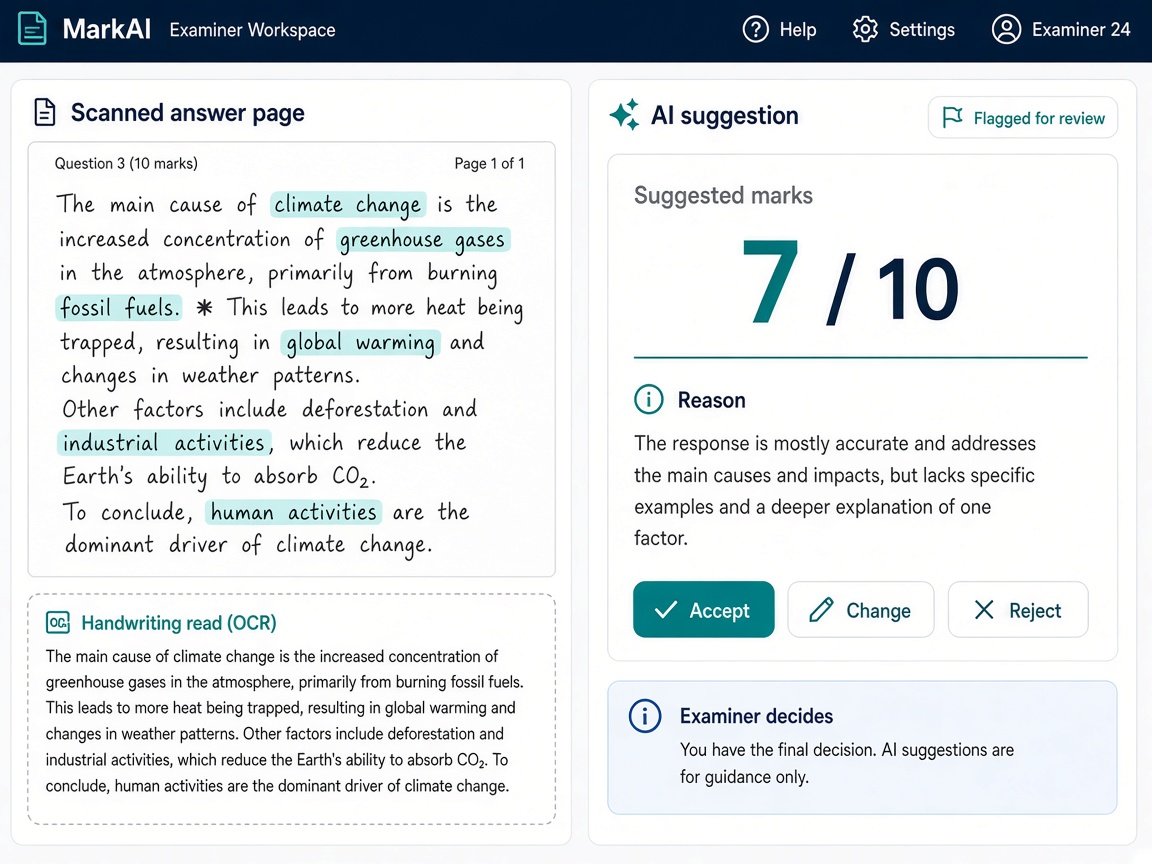
- Handwriting reading (OCR) for long answers
- AI suggests marks and gives a short reason
- Scripts that need a closer look are flagged
- Examiner can accept, change, or reject every suggestion
Read long handwritten answers faster
Essay-style papers are slow to read. OCR turns handwriting into text you can scan on screen next to the original page.
Bulk text recognition
Run handwriting recognition across many pages in batch jobs—especially useful when thousands of long answers arrive at once.
Text beside the scan
Review the typed text alongside the image when you need to check a word or phrase the reader misread.
Optional—not required
Turn OCR on when it helps your exam type. Short-answer papers can skip it; essay exams benefit most.
Works with on-screen marking
OCR supports the same My Marking screen examiners already use. No separate tool to learn.
AI suggestions—with the examiner in charge
AI can suggest a mark and flag scripts that need a second look. It never finalizes results on its own.
Suggested mark and reason
See a proposed mark and a short explanation. Use it to speed up a first read, not to replace judgment.
Accept, change, or reject
Every suggestion needs a human decision. The system does not publish AI marks without an examiner confirming them.
Flagged scripts for leads
Scripts that look unusual are flagged. Admins get reports and batch lists to review before or while assigning work.
Batch review for operations
Run batch jobs to process OCR and AI flags at scale, then route only the exceptions to senior staff.
More Next OSM features
Exam setup
Create each exam, choose how marks are given, import your candidate list, and decide when results can be published. Link an exam to a test you already run in Next Learner LMS.
inventory_2Bundles & logistics
Set up exam centers, register sealed packets, print barcodes, and know what has been sent, received, and stored—before scanning starts.
scannerScan & upload
After Next Scanning exports packages ready for OSM upload, complete digital intake here—then OSM QC, QC approval, and evaluation workflows.
assignment_indAssignment & pipelines
Show clear queues, assign answer scripts by hand, build marker teams and step-by-step marking plans, and support double marking when your policy requires it.
drawMarking on screen
Examiners read scanned handwritten answer sheets on screen, write notes on the page, enter marks per question or one total, save and continue later, and send a script back to quality check if needed.
summarizeResults & reports
Dashboards show progress and bottlenecks; export results to Excel or CSV; publish marks to students on the portal or a simple lookup when you enable that option.
paymentsMarker payments
Set pay rates per marker, preview totals before you pay, approve a payment batch, and export files for finance—based on scripts actually marked in the system.
securitySecurity & audit
Each customer's data is kept separate. People only see what their role allows, and an audit log shows who did what and when, including any change made in a recheck.
See OCR & AI help in a live demo
We will show this step for your exam office—however many centers, scripts, and markers you run.
Request a demo